
One message.
Ready for the right screen.
Use this as your production starting point. The final placement requirements are confirmed with the campaign team before delivery.
Start here.
Confirm the final details.
| Format | Specifications |
|---|---|
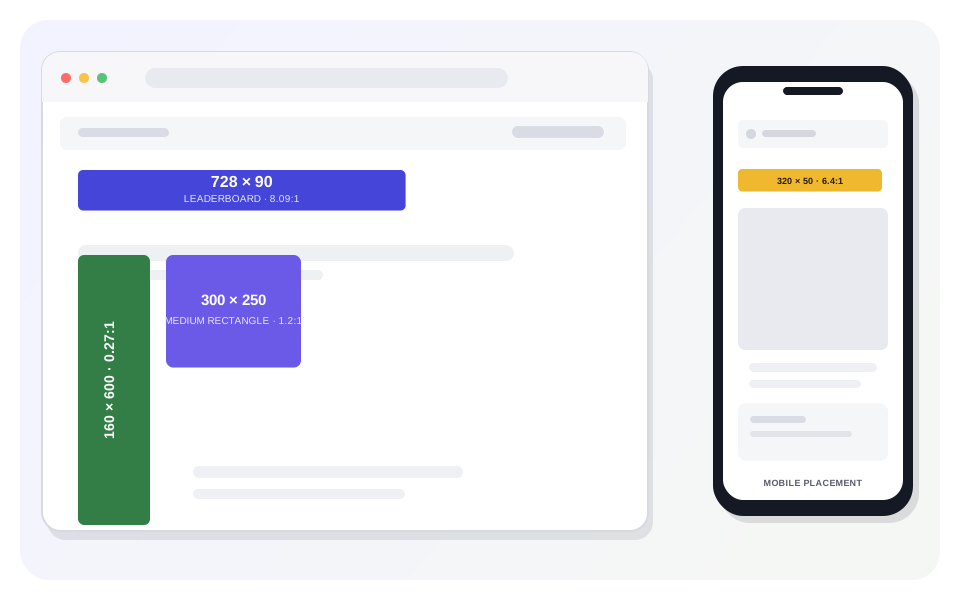
| Display banners | Ad format: Display banners. Accepted sizes: All IAB standard sizes. High-demand sizes: 300 × 250, 300 × 600, 320 × 50, 160 × 600, 728 × 90 px. File formats: JPG, JPEG, PNG, GIF, HTML5 (ZIP). Click-through: Supply the target URL and advertiser website domain. Targeting: Specify countries or regions. |
| MasjidConnect™ | Placement: TV screen displays. Aspect ratio: 16:9 widescreen. File format: PNG preferred. Creative restrictions: Images of living beings, including humans and cartoon characters, are strictly prohibited. Use only halal objects, food, jewelry, Islamic decorations, and other inanimate subjects. Optional QR code: May be embedded in the creative and linked to a product page, landing page, or promotional URL. Targeting: Specify U.S. states. |
| Connected TV (CTV) | Ad format: In-stream video; pre-roll, mid-roll, or post-roll. Length: 15 or 30 seconds recommended; up to 60 seconds. Resolution: 1920 × 1080 (Full HD). Aspect ratio: 16:9. File type: MP4 (H.264 preferred). Maximum file size: Typically ≤ 500 MB. Audio: Required; clear and balanced. Frame rate: 23.98–30 fps. |
Specifications are aligned to the supplied media kit reference. Confirm final asset acceptance and placement availability before delivery.
Before you send
the final files.
A small check now can prevent a confusing experience later. This checklist is local to the page and does not upload or approve your assets.
0 of 7 checks completed. Not saved after you leave this page.
Make the creative work
as hard as the placement.
Share the campaign brief and confirm the formats you need.